CartoonDream-Aging Face Filter
- 4.4
- Rating
- 500.00K
- Installs
- Free
- Price
 Analysis by App-foxy
I usually reach for an AI art app when I have a clear picture in mind but not the drawing skills or time to create it manually. CartoonDream-Aging Face Filter is aimed at that exact moment: you bring in a face image, choose a playful cartoon direction, and let the app turn the starting photo into something more stylized. After spending time with it, I found the appeal easy to understand. It is less like a complete digital art studio and more like a quick transformation tool for people who want an eye-catching result without learning layers, brushes, or complicated editing controls.
The app sits in the Art & Design category and comes from FutureDream Lab. It is free to install, rated for Everyone, and supports devices running Android 6.0 or later. Its current version is 1.3.9. That broad compatibility makes it accessible, although the experience still depends heavily on the quality of the phone, the source image, and the amount of processing involved in creating the final effect.
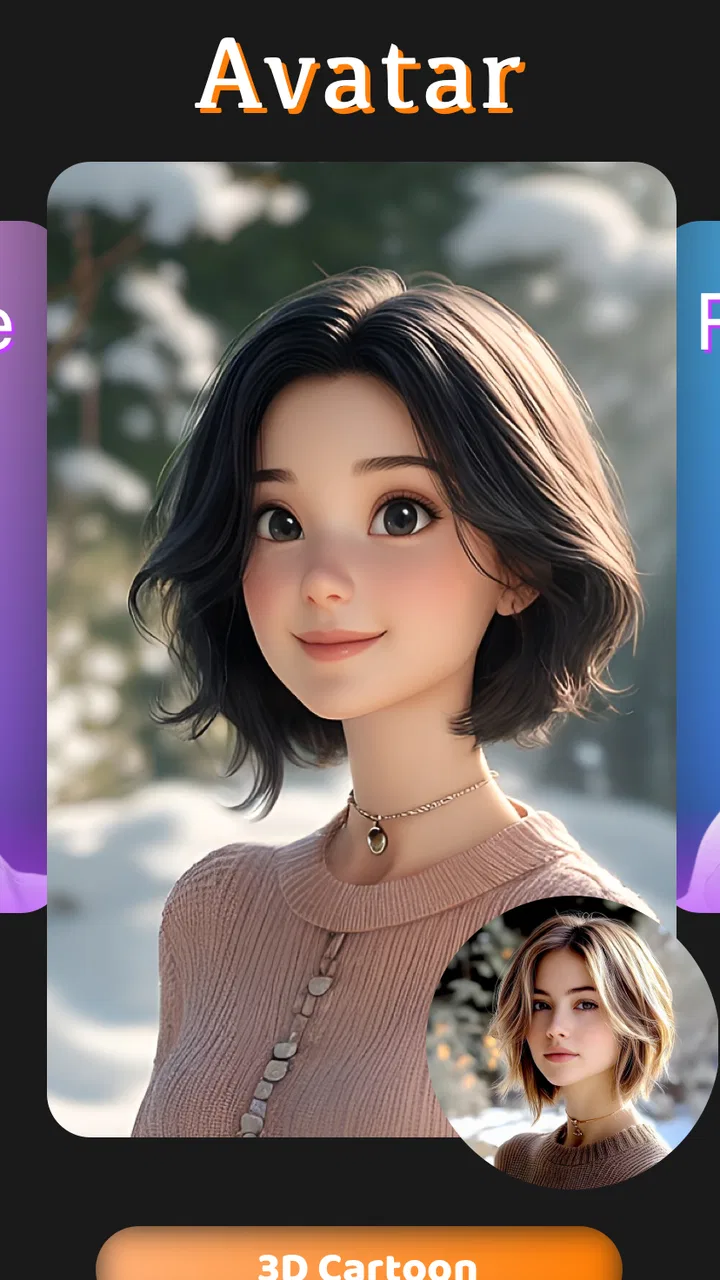
From an ordinary portrait to a cartoon-style result
I’ll look at the point where a plain portrait becomes a stylized image, including how the source photo shapes the result and what I check before using it. A useful first step is to choose the intended use—an avatar, a greeting, or a character reference—because that helps me judge whether the transformation is doing the right job.
You May Also Like

 Blood Strike: 2.5 Anniversary
Blood Strike’s Loadouts Turn Every Drop Into a Tactical Gamble
A close look at Blood Strike’s custom loadouts: how fast access to signature weapons reshapes its battle royale rhythm, rewards preparation, and narrows the gap between fights.

 Pandora - Music & Podcasts
Pandora’s Music Is Easy to Start, but Harder to Recover
Pandora’s strength is its low-effort path from a seed to a station. Its weak spot is how much confidence it asks you to place in connection, setup, and quiet recovery.

 8 Ball Pool
 Is Built on Rivalries, Rematches, and Routine
A close look at the rivalries, rematches, shared routines, and unanswered safety questions that turn a quick pool match into a persistent mobile community.

 Samsung Music
’s Quiet Strength Is Playing What You Already Own
Its reach comes less from spectacle than from dependable access to a personal library. That simplicity is both the app’s strongest retention engine and its ceiling.

 AccuWeather: Weather Radar
AccuWeather Review: A Quick, Clear Forecast for Everyday Decisions
For everyday plans, the best forecast is the one you can understand quickly. AccuWeather makes rain timing, radar, and local conditions easy to act on, with a few trade-offs.

 Hill Climb Racing
Why Hill Climb Racing Still Turns Crashes Into One More Run
A tiny car, a bumpy hill and one more upgrade: Hill Climb Racing keeps resurfacing because its simple chaos makes every near-miss feel personal.
More From Our News Desk
View All News


The starting condition matters more than I expected
The best place to begin is with a clean portrait where the face is visible and the lighting is reasonably even. I would not use a heavily blurred selfie, a group photo with several faces, or an image where sunglasses, hair, or shadows hide important facial details. AI filters can be forgiving, but they still need a recognizable starting point. A simple front-facing picture gives the effect a much better chance of preserving the person’s identity while adding the exaggerated look people expect from cartoon artwork.
This is one of the first practical lessons I took away: the app cannot rescue every weak input. If the original photo already has distracting colors, a busy background, or a very unusual angle, the final image may feel less intentional. Taking a new picture specifically for the filter is often more useful than repeatedly processing an old one. A plain background also helps when the face is the main subject and you want the result to work as a profile image, message sticker, or casual social post.
Before starting, I would also decide what the finished image is for. A funny avatar, a birthday greeting, a character reference, and a printable illustration all need different levels of polish. CartoonDream is most convincing when the goal is a quick, expressive image rather than a carefully art-directed composition. That distinction prevents disappointment later, especially if you normally use a full editor such as a layer-based drawing app.
The basic flow is deliberately approachable
The workflow feels designed for short sessions. I start by selecting a portrait, then move through the available cartoon-oriented treatment rather than building an image from a blank canvas. This is a useful choice for beginners because there is no need to understand brushes, masks, opacity, or color theory before seeing a result. The app’s central idea is immediate visual conversion: give it a face and let the style do most of the work.
That simplicity is also the main trade-off. A traditional photo editor gives me precise control over cropping, retouching, contrast, and selective adjustments. A drawing app gives me control over every mark. Here, the creative decision happens earlier, when I choose the right source image and decide whether the generated look fits my purpose. If the result is close but not quite right, I may have fewer ways to repair one specific detail without starting again.
For a practical workflow, I recommend preparing two or three source portraits before opening the app. Try one with a neutral expression, one with a stronger expression, and one with the face turned only slightly to the side. Comparing the outputs can reveal which image gives the filter the clearest facial structure. This small preparation step is more valuable than endlessly tweaking a poor source photo.
Where the handoff from photo to AI becomes visible
The most interesting part of using an AI filter is the handoff between what I provide and what the system interprets. The original portrait contains real details, but the cartoon result has to simplify them. Facial proportions, hair edges, skin tone, glasses, and expression may all be reinterpreted to fit the chosen visual treatment. That is why the result can feel charming in one image and strangely generic in another.
I pay particular attention to the eyes and mouth when reviewing the output. Those areas carry much of a person’s personality, so a convincing cartoon does not merely add bright colors; it keeps enough of the original expression to remain recognizable. If the face looks polished but no longer resembles the person, I consider that a weak handoff rather than a successful transformation.
There is a useful creative advantage here too. Because the app is not asking me to manually draw every feature, it can produce a result that feels more finished than my own quick sketch would. That makes it handy for brainstorming characters. I can test the visual direction of a fictional persona from a reference face, then use the image as a starting point for a more deliberate illustration elsewhere.
A realistic everyday use case
Imagine taking a family selfie before sending a birthday message. Instead of attaching the unedited photo, I would choose the clearest face, run it through the cartoon treatment, and use the result as a playful greeting image. The process is quick enough to fit into an ordinary messaging routine, and the stylized outcome gives the message a more personal feel than a standard emoji.
Another practical use is a temporary profile picture. If I want something recognizable but less literal than a normal photograph, a cartoon portrait can work well. It can also help a small creator sketch out a visual identity before commissioning artwork. In that situation, I would treat the output as a concept reference rather than a final brand asset. The distinction matters because an AI-generated filter result may not offer the consistency or precise art direction needed across multiple images.
For parents and children, the Everyone content rating makes the app approachable in terms of audience. I would still supervise younger users around sharing and saving images, not because the rating makes the creative process unsuitable, but because the important decision is what happens to a person’s portrait after it has been transformed. The app is fun as a creative activity, while image-sharing choices remain a separate responsibility.
Getting from result to usable image
Once the transformation is complete, I judge the image in context rather than only on the app screen. A face that looks attractive in a large preview may become too busy when reduced to a small avatar. Conversely, an effect that seems exaggerated at first can work nicely as a sticker or greeting image. I usually check the result at the size where I plan to use it, because this quickly exposes muddy details and distracting backgrounds.
This is also where the app’s role becomes clear. It is a front end for a creative outcome, not necessarily the final stop in the workflow. If I need text, a border, a collage, or exact placement in a social graphic, I would hand the generated image to a separate editor. That extra step is not a failure; it is simply the natural boundary between an AI transformation tool and a general-purpose design application.
A helpful habit is to keep the original portrait beside the transformed version until the project is finished. That makes it easier to compare whether the cartoon still represents the person and prevents accidentally treating the generated image as the only copy. It also gives me a reference if I later want to create a matching image with another tool.
What the free entry point really means
The app is free to download, which makes it easy to test without committing money at the start. However, in-app purchases range from $24.99 to $159.99 per item. That is a wide range, so I would examine any purchase screen carefully before confirming anything and make sure I understand what is included. A free installation is useful for sampling the workflow, but it should not be confused with unlimited access to every possible option.
For casual users, the sensible approach is to begin with one or two clear projects and decide whether the results justify spending more. Someone who only wants a single funny avatar may find the free entry point sufficient, depending on what is available during use. A frequent creator should think about the total cost before building the app into a regular production routine, especially when other editors provide more manual control without relying on a transformation-focused workflow.
I also would not choose the app solely because it promises speed. Speed is valuable when the desired result is simple, but a quick output still needs review. Check the face, the expression, the hair, and any accessories before sharing. A few seconds of inspection can catch an awkward interpretation that would otherwise make the final image look careless.
Where this workflow breaks down
The flow is weakest when I expect exact control. If I need a particular pose, a consistent character across a series, carefully matched colors, or a precise commercial illustration, a single cartoon filter is not the right foundation. I would start with a dedicated drawing app, a professional photo editor, or a more controlled image-generation workflow instead. Those tools take longer to learn, but they give me more authority over the details that matter in serious projects.
It can also be a poor fit for images with multiple people. Even when a filter recognizes everyone, the visual treatment may not give each face equal attention. A group portrait can therefore produce an uneven result, with one person looking clear and another appearing less defined. For that situation, processing individual portraits separately and combining them later may be more reliable, although it adds work and may make the styles feel less uniform.
Very stylized source photos create another point of friction. Strong color casts, extreme shadows, dramatic angles, or partial face coverings can push the result away from the person’s actual appearance. I would not call that a defect in every case; sometimes the unexpected interpretation is exactly what makes an image entertaining. But if resemblance is important, controlled lighting and a straightforward pose are safer choices.
How it compares with familiar alternatives
Compared with a standard photo editor, CartoonDream-Aging Face Filter is faster to approach and less intimidating, but it gives up detailed adjustments. A conventional editor is better when I want to correct one feature, preserve the exact face, or combine the portrait with typography and design elements. The cartoon app wins when I want the visual transformation itself to happen with minimal setup.
Compared with a drawing app, it is better for instant experimentation and worse for original hand-made work. I can use it to explore a character mood or create a starting reference, but I would not expect the same control over line quality, composition, or repeated visual motifs. Compared with ordinary social-media filters, it feels more focused on producing a standalone cartoon portrait rather than merely adding a temporary camera effect.
That makes the choice fairly straightforward. Pick this app when the main question is, “What would this face look like as a cartoon?” Pick a more advanced alternative when the question is, “How can I control every part of the finished artwork?” The difference is not just feature count; it is the amount of creative responsibility the tool gives back to the user.
Who will get the most from it
I think the strongest audience is made up of casual creators, families, social users, and beginners who want a visual result without studying an art program. It is also useful for anyone collecting quick character references or testing whether a portrait has enough personality to support a cartoon treatment. The free installation lowers the barrier to trying that idea, while the Everyone rating keeps the app broadly approachable.
I would be more cautious recommending it to professional illustrators, photographers who need faithful retouching, or teams that require repeatable brand output. Those users may appreciate the speed during brainstorming, but they are likely to reach the app’s control limits quickly. The purchase range also deserves attention for anyone planning frequent use, because a tool that begins as a casual experiment can become expensive if every project depends on paid access.
My final take after following the complete workflow
CartoonDream-Aging Face Filter succeeds when I treat it as a focused creative shortcut. The starting portrait matters, the AI handoff needs a quick quality check, and the final image may still need another app if I want text or a more finished layout. Used that way, it turns an ordinary face into a shareable cartoon concept with very little technical effort.
FutureDream Lab has made an accessible Art & Design app rather than a full replacement for drawing or photo-editing software. It has a 4.4 average from around 3.4 thousand ratings and more than 500 thousand installs, which suggests that the quick-transformation idea has found a substantial audience. I would recommend CartoonDream-Aging Face Filter to someone who wants playful portraits, fast experiments, or a simple creative activity. I would skip it for precision work and choose a conventional editor when control, consistency, and detailed finishing matter more than immediacy.
My practical recommendation is to start with a well-lit single portrait, compare the result at its intended sharing size, keep the original image, and review purchase options before committing. If that workflow matches what you want, the app can be an enjoyable shortcut. If you need to direct every artistic decision, it is better used as an idea generator than as the centerpiece of your creative process.
FAQs for CartoonDream-Aging Face Filter
01What is CartoonDream-Aging Face Filter and how does it work?
CartoonDream-Aging Face Filter is an app that transforms your photos into cartoon-like images and allows you to see an aged version of your face. The app uses AI technology to apply filters and aging effects to your images, giving you a fun and creative way to visualize changes over time.
02Is CartoonDream-Aging Face Filter available for both Android and iOS?
Yes, CartoonDream-Aging Face Filter is available for both Android and iOS devices. You can download it from the Google Play Store for Android or the Apple App Store for iOS. Ensure your device meets the app's system requirements for optimal performance.
03Does CartoonDream-Aging Face Filter require an internet connection?
While some features of CartoonDream-Aging Face Filter may work offline, an internet connection is generally required to access the full range of features, including downloading new filters and updates. The app may also need connectivity to process certain effects using cloud-based AI technology.
04Are there any privacy concerns with using CartoonDream-Aging Face Filter?
CartoonDream-Aging Face Filter might request access to your photos and camera. It’s important to review the app’s privacy policy to understand how your data is used and whether it’s shared with third parties. Always ensure you are comfortable with the permissions before proceeding.
05Is CartoonDream-Aging Face Filter free to use?
CartoonDream-Aging Face Filter offers a free version with basic features. However, there may be in-app purchases or a subscription model to access premium filters and additional functionalities. Check the app’s pricing structure to see if it fits your needs and budget.
Pros
- Easy-to-use interface for quick edits.
- Offers a variety of fun filters.
- Real-time preview before saving.
- Supports high-resolution images.
- Regular updates with new features.
Cons
- Contains in-app purchases for premium features.
- Occasional ads can be distracting.
- Permissions required may seem intrusive.
- Limited editing tools beyond filters.
- Some filters require internet connection.

CartoonDream-Aging Face Filter
Gallery